






Direct Payables & Send
Direct Payables & Send is a solution designed to simplify how you move money and access essential financial data.
With Direct Payables & Send, you can automate the delivery and receipt of ACH, Wire, Remote Deposit X9 files and Positive Pay files directly from your ERP system through SFTP. You can also receive the account and transaction data you rely on, delivered securely to your SFTP folder. This removes manual steps, reduces errors, and helps your team work more efficiently.
Together these tools help streamline your workflows and give your business a more modern, connected and dependable banking experience. The setup is fast and easy, and our knowledgeable support teams are here to assist you with your Direct Payables & Send needs.
Direct Payables
- Allows you to transmit ACH and wire files to Banner Bank through our Bank’s SFTP server.
- Allows you to view details of all transactions in Banner Business Online Banking
Direct Send for Positive Pay & Remote Deposit
- Positive Pay check issue files can be sent daily through Banner’s SFTP server.
- Remote Deposit X9 files can be sent throughout the day for processing.
Direct Send for BAI Reporting
- Connect Banner’s SFTP server to pull daily files and reports for previous day transactions.
- Import files to your accounting software for daily reconciliation purposes.
File Format Specifications
Positive Pay
Format Options: Excel, fixed length, delimited
Required Fields:
- Account Number
- Check Number
- Dollar Amount
- Issued Date
- Payee Name
- Record Type (optional)
Details of Positive Pay issued items can be viewed in Banner Business Online Banking. For same-day processing, please upload your daily check issued file by 10 p.m. PT.
ACH
Format: Standard NACHA File ~ Balanced
File Name Requirements:
- Bank’s FI Number: 3388
- Customer Number: (provided by the bank)
- Date Format: YYYYMMddhhmmss
Example File Name:
NACHA: 3388_1234456_20210603111235.txt
File Example:

Email Notification Example:

Wire
Format Option: csv
File Name Requirements:
- Bank’s FI Number: 3388
- Customer Number: (provided by the bank)
- Date Format: YYYYMMddhhmmss
Example File Name:
Domestic wire: 3388_1234456_20210603111235.csv
File Specifications:
- Contains exactly 29 column headers in the first row.
- Requires the column headers listed below.
- Places payment information in subsequent rows.
Required Column Headers:
• recipient_account
• recipient_name
• recipient_addr_1
• recipient_addr_2
• recipient_city
• recipient_state
• recipient_postal code
• beneficiary_routing_number
• beneficiary_name
• beneficiary_addr_1
• beneficiary_addr_2
• beneficiary_city
• beneficiary_state
• beneficiary_postal code
• intermediary_name
• intermediary_routing_number
• intermediary_addr_1
• intermediary_addr_2
• intermediary_city
• intermediary_state
• intermediary_postal_code
• from_account
• receiver_name
• receiver_routing_number
• fi_to_fi_information
• beneficiary_reference
• message_to_beneficiary
• amount
• purpose_of_wire
Email Notification Example:

Details of all originated wire transactions can be viewed in Banner Business Online Banking.
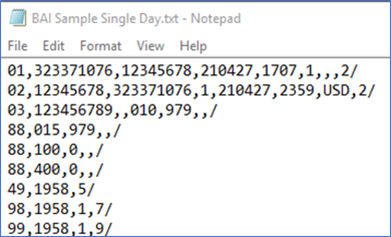
BAI Reporting
Format Option: Standard BAI
Additional BAI formats are available if needed.
File Example:
Remote Deposit X9
Format Options: ANSI X9;37, ANSI X9;100
File Requirements:
- The incoming file will include images that meet X9 file standards.
- The file may include one or more bundles (or deposits).
- The file may include one or more cash letters (SFTP only).
- The X9 file must include a date in the Settlement Date field (Field 7) or Record 90 - Cash Letter Control Record.
- The Image View Compression Algorithm Identifier field (Field 6) in Record 50 – Image View Detail Record – should be set to 00.
Acknowledgement File Examples (ACK Files)
